For over 30 years, Type to Learn has elevated typing instruction going beyond rote drills giving educators powerful, actionable insights into student performance and progress. Its robust reporting suite and teacher-centered tools are designed not just to track results but to inform instruction, saving time while fostering better student outcomes.
🔍 Multi-Tiered Reporting for Holistic Oversight
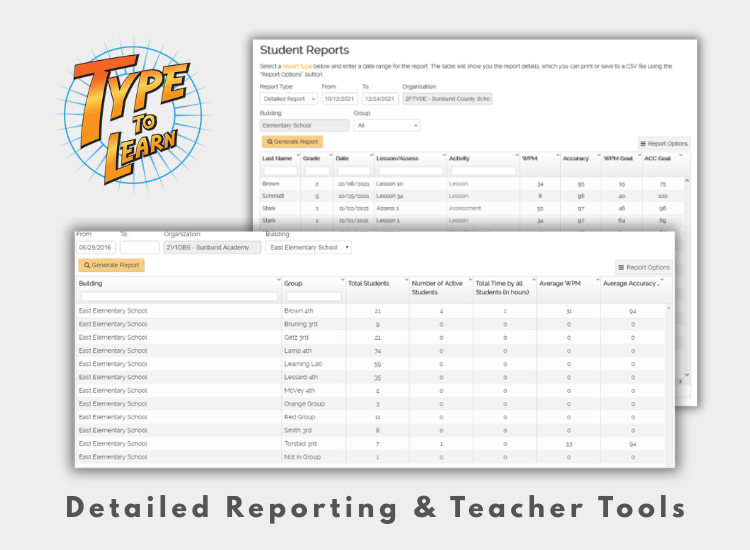
Type to Learn offers three tiers of reporting that empower teachers to see the big picture and zoom into the details:
- Status Reports give a high-level snapshot of where students are in their learning journey, including speed (WPM) and accuracy relative to goals.
- Detailed Reports break down every completed lesson, activity, assessment and challenge, showing metrics like WPM, accuracy, and Adjusted WPM—a composite measure that multiplies speed by accuracy, revealing real typing proficiency.
- Admin-Level Reports show usage and performance across classes or even entire schools, giving administrators a way to evaluate program effectiveness at scale.
Every report can be filtered, printed, or exported as a CSV for deeper analysis or record keeping—turning raw data into meaningful insights.
📊 Real Insight—Not Just Raw Numbers
What truly sets Type to Learn apart is the depth of its analytics. Teachers can see not just how fast students type, but how accurately they do so over time, and exactly which lessons or activities contributed to growth. This insight helps educators identify:
- Students who need more practice or intervention
- Trends in class progress over weeks or months
- Specific keys or typing patterns where students struggle
Rather than guessing who’s behind or ahead, teachers have data that drives instruction.
🧑🏫 Tools Designed for Real Classroom Use
Beyond numeric reports, Type to Learn supports teachers with tools that help manage and personalize instruction:
- Teachers can group students and assign or adjust settings for individuals or entire classes.
- Progress is tracked automatically, adapting goals for speed and accuracy based on each student’s performance.
- Save time with quick grading and printable reports that fit into existing classroom workflows.
Together, these tools help teachers spend less time wrestling with data and more time tailoring support and celebrating student growth.
📈 Why It Matters
Unlike simpler typing programs that offer only basic scoreboards or generic practice logs, Type to Learn’s reporting system provides meaningful evaluation and instructional feedback. Educators get both big-picture statistics and granular insights, enabling informed decisions and targeted teaching strategies.
Want to see it for yourself? Schedule a demo today or Request a Free Trial